Appium’s appium-ios-simulator has an ability to make simulator instance dark mode by issue. The ability affects entire system, but it works only on Simulator.
We can handle the style in real devices, too, when the app has a logic to switch it in the code level. We also can control the configuration via process arguments to manage it via Appium tests.
https://github.com/KazuCocoa/darkmode-example is the example repository.
Swift code
Below code is an example. When the code exists in SceneDelegate.swift , we can force the app’s user interface style dark mode. Then, the app handles as dark mode, but other apps follow system preference. So, the scope is only the app.
if ProcessInfo.processInfo.arguments.contains("test_darkmode") {
    window.overrideUserInterfaceStyle = .dark
}
https://developer.apple.com/documentation/uikit/uiview/3238086-overrideuserinterfacestyle
Appium
We can handle the preference via process arguments. Below’s processArguments is it.
caps = {
  desired_capability: {
    platformName: :ios,
    automationName: :xcuitest,
    app: 'path/to/build/Build/Products/Debug-iphonesimulator/darkmode-example.app',
    deviceName: 'iPhone Xs Max',
    platformVersion: '13.1',
    processArguments: { args: ['test_darkmode'] }
  }
}
@driver = ::Appium::Core.for(caps).start_driver
Once you set processArguments: { args: ['test_darkmode'] } in the capability and run it, then Appium launch the test app with the argument. As a result, the test app launch with dark or light mode.
You can make sure the process has the arguments via mobile: activeAppInfo command.
## With 'processArguments: { args: ['test_darkmode'] }
> @driver.execute_script('mobile: activeAppInfo', {})
#=> {"processArguments"=>{"env"=>{}, "args"=>["test_darkmode"]}, "name"=>"", "pid"=>27048, "bundleId"=>"com.kazucocoa.darkmode-example"}

## Without 'processArguments: { args: ['test_darkmode'] }'
> @driver.execute_script('mobile: activeAppInfo', {})
#=> {"processArguments"=>{"env"=>{}, "args"=>[]}, "name"=>"", "pid"=>28154, "bundleId"=>"com.kazucocoa.darkmode-example"}
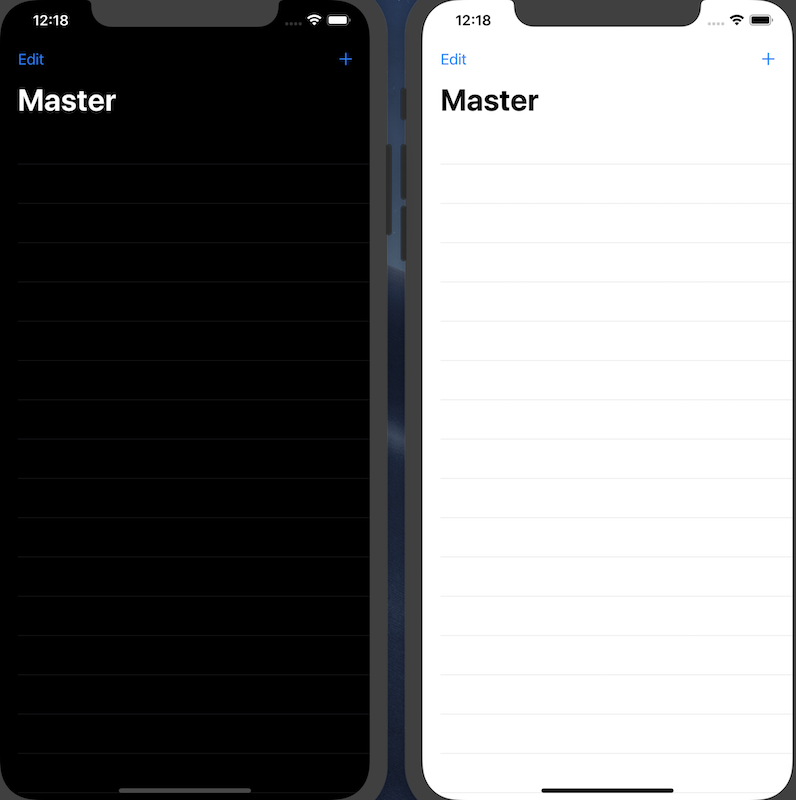
Conclusion
The process argument is a trick to handle test environment in iOS. You can configure such environment with it well 🙂
BTW, this technique is available for pure XCUITest, too.
Happy testing.


Hi there,
Kazu, do you think that this trick may be used also on external app? For example, for Apple’s email applications?
Thanks for you answer
No, since this method requires to add magic in the app under test.
You can try out
mobile: setAppearancecommand introduced in Appium 1.17.0.It changes the device under test’s preference. With Xcode 11.4 and a simulator, it works with xcrun command. Others are as a Siri command. (‘Turn dark mode on’)
https://github.com/appium/appium/blob/master/docs/en/commands/mobile-command.md
Hello again,
Ohh, it’s so simply and genius! I didn’t think about using Siri to change the appearance style.
Thank you again for your time, much appreciate
Hey there,
I’ve tried switching to darkMode on iOS sim by using self.driver.execute(“mobile: setAppearance”, {‘style’: ‘dark’}) but it doesn’t work at all. I’ve used the command as a first line in my class, but also before that, right after self.driver = webdriver.Remote(“http://localhost:4723/wd/hub”, desired_cap) in setUp(). Any ideas?
Also, should I add something extra in desired_caps?
Thanks!
Can you run
xcrun simctl ui <device> appearance darkon your local? The command wraps thesimctlcommand, so if the command did not work well, then the command does not work, unfortunately.I did add this capability in my Appium Inspector to run in simulator but it’s still not setting the appearance to darkmode. I’m on Appium 1.19.1 iOS Sim 14.3. Do you have any suggestion?
Hi Kazu,
I did add “processArguments”: “{\“args\”: [\“test_darkmode\”]}” capability in my appium inspector to run in simulator but it’s still not setting the appearance to dark mode. I’m on appium 1.19.1 and iOS sim 14.3. Do you have any suggestion?
Did you implement your iOS app code properly? Even Appium succeeded to pass arguments properly, this should not work if the iOS app code has no proper change.
My iOS app should be ready for darkmode, not sure what else to check. I want to make it work first with Appium Inspector before implementing changes on our test automation in saucelabs simulator. (Sorry for the duplicate comments lol I thought my input from work laptop didn’t push thru so had to retype on my phone)
Np > duplication
As I addressed in this article, your app under test should have like below line. Appium can give process arguments to the app under test when Appium launches the app. But once the app gets the process argument, how to handle it depends on the app under test internal.
https://github.com/KazuCocoa/darkmode-example/blob/9c7ad0842de255b1c024f788e22633f9ef06a073/darkmode-example/SceneDelegate.swift#L29-L31