iPad OS has been released. On the OS, we can use split screen feature to handle multiple apps on the screen. In this case, there are multiple active apps on the screen.
Appium 1.15.0 has defaultActiveApplication settings API to handle such case. You can handle on of them specifying the app as defaultActiveApplication.
Below is the example to launch test app, documents app as floating mode (default behaviour), switch to the active app and interact to it.
# Launch test app
@driver.activate_app 'com.example.apple-samplecode.UICatalog'
@driver.find_element :name, 'Buttons' # can find

# Launch Document as a floating screen
@driver.activate_app 'com.apple.DocumentsApp'
@driver.update_settings({ defaultActiveApplication: 'com.apple.DocumentsApp' })
@driver.find_element :name, 'Sign in to iCloud'
els = @driver.find_elements :name, 'Buttons' # cannot find
assert els.size == 0

# Change the test target
@driver.update_settings({ defaultActiveApplication: 'com.example.apple-samplecode.UICatalog' })
@driver.find_element :name, 'Buttons' # can find
els = @driver.find_elements :name, 'Sign in to iCloud'
assert els.size == 0


@driver.update_settings({ defaultActiveApplication: 'com.apple.DocumentsApp' })
e = @driver.find_element :name, 'Sign in to iCloud' # can find
e.click

# click centre point to close the document app
window = @driver.window_rect
action_builder = @driver.action
input = action_builder.pointer_inputs[0]
action_builder
    .move_to_location(window.width / 2, window.height / 2)
    .pointer_down(:left)
    .pause(input, 1)
    .release
    .perform

e =  @core.wait { @driver.find_element :name, 'Cancel' }
e.click
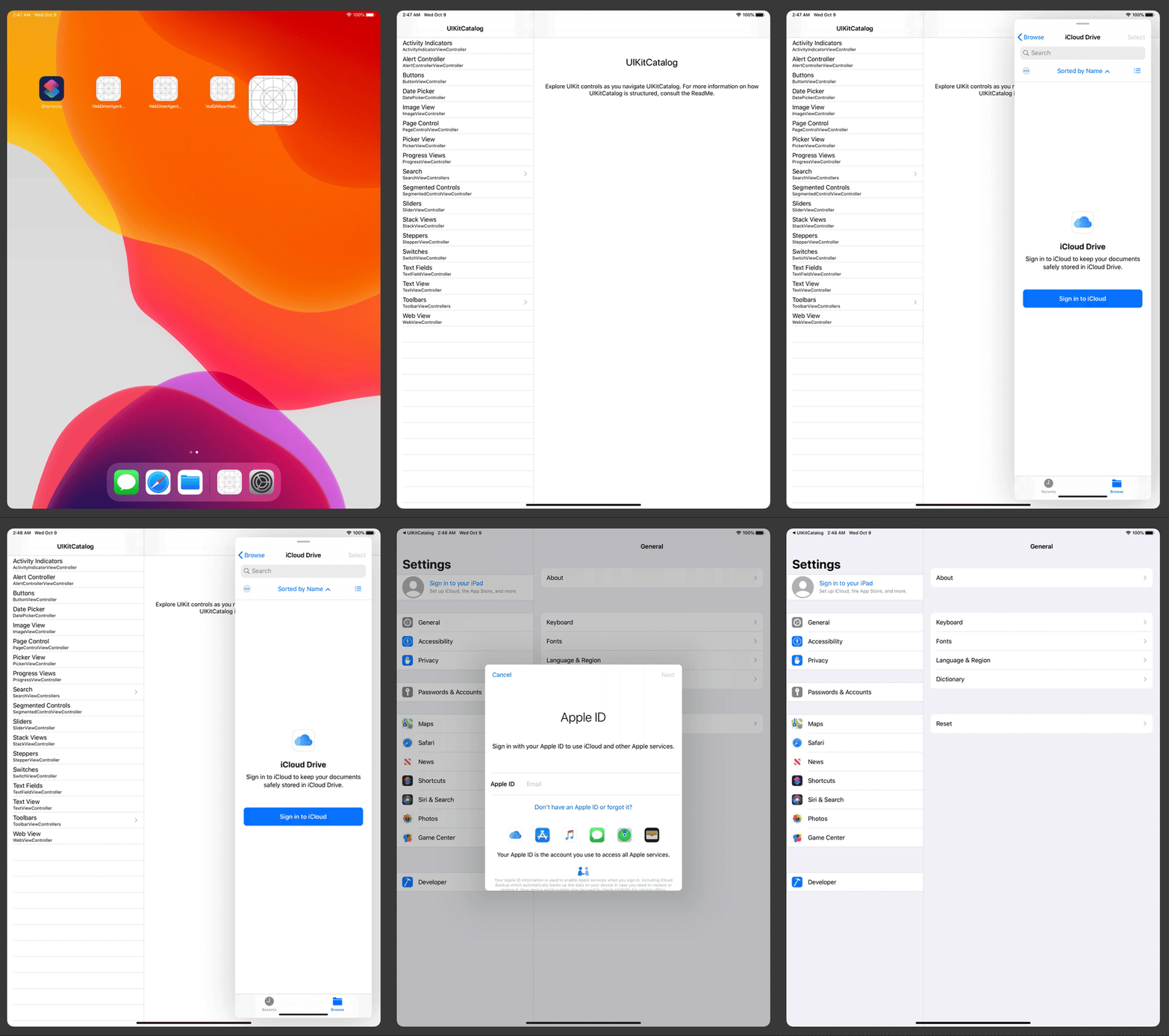
@driver.update_settings is the API to update settings. You can specify the target bundle id as the argument of defaultActiveApplication to handle it via commands. Then, you can find element/s on the app. Once you change the target app, you cannot find elements on another app.
When you would like to make sure what app is ‘active’ currently, let’s call activeAppInfo mobile command like @driver.execute_script('mobile: activeAppInfo', {}). Then, you can get information of current active app including its bundle id. The command works fine with appium@beta which will be 1.16.0.
This method, defaultActiveApplication, can work for non-float type’s split screen, too.
Handling multiple apps on the screen will make our automation harder to handle them properly, but we would like to make them available as possible in stable way.
Happy testing


Hi KazuCocoa
Thanks for sharing the knowledge.
Any ideas on how to automate Real Split view like below
https://www.imore.com/sites/imore.com/files/styles/w830_wm_blw/public/field/image/2019/09/ipad-pro-129-split-screen.jpg?itok=d5AEUMuc
TO put application in this mode do we any XCUI API to directly launch to Apps in this mode ?
Any leads will be appreciated .
Your follower
Rahul Pahuja
Hi Rahul,
Vanilla XCTest framework doesn’t provide such API. So, maybe there is no way to do that via official APIs.
I haven’t tried, but potentially W3C actions can achieve gestures such as slide over.
https://support.apple.com/en-us/HT207582