Google announced Jetpack Compose to simplify and programable UI development. I thought it was like Flutter then 🙂
I wondered if we can get view hierarchy correctly via the feature since if the feature is like Flutter, it is not on full Android view system. Espresso and UiAutomator probably cannot find element provided by it. (Kind of Unity app)
https://github.com/KazuCocoa/pagesource-jetpack-compose is the result. (I’m updating the repo)
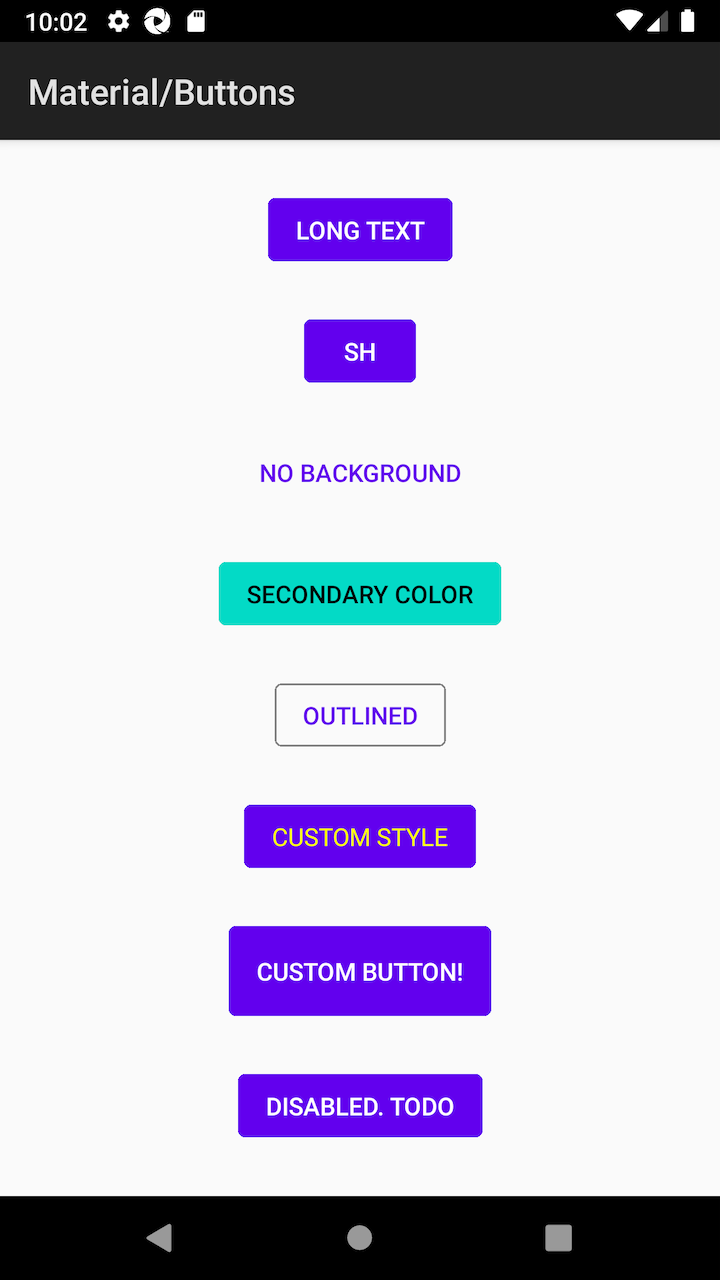
The left image is button view. If they are built by XML, Espresso and UiAutomator can get full hierarchy to detect elements.
But as following XML, I was not able to get each element via them. uiautomator2 in Appium gets elements via UiDevice. espresso gets elements via ViewGroup (Ordinary, we get them via breadthFirstViewTraversal, but it caused OOM, so we changed to get view data via View…)
uiautomator2 Driver
<?xml version='1.0' encoding='UTF-8' standalone='yes' ?>
<hierarchy index="0" class="hierarchy" rotation="0" width="1080" height="1794">
  <android.widget.FrameLayout index="0" package="androidx.ui.demos" class="android.widget.FrameLayout" text="" checkable="false" checked="false" clickable="false" enabled="true" focusable="false" focused="false" long-clickable="false" password="false" scrollable="false" selected="false" bounds="[0,0][1080,1794]" displayed="true">
    <android.view.ViewGroup index="0" package="androidx.ui.demos" class="android.view.ViewGroup" text="" resource-id="android:id/decor_content_parent" checkable="false" checked="false" clickable="false" enabled="true" focusable="false" focused="false" long-clickable="false" password="false" scrollable="false" selected="false" bounds="[0,0][1080,1794]" displayed="true">
      <android.widget.FrameLayout index="0" package="androidx.ui.demos" class="android.widget.FrameLayout" text="" resource-id="android:id/action_bar_container" checkable="false" checked="false" clickable="false" enabled="true" focusable="false" focused="false" long-clickable="false" password="false" scrollable="false" selected="false" bounds="[0,63][1080,210]" displayed="true">
        <android.view.ViewGroup index="0" package="androidx.ui.demos" class="android.view.ViewGroup" text="" resource-id="android:id/action_bar" checkable="false" checked="false" clickable="false" enabled="true" focusable="false" focused="false" long-clickable="false" password="false" scrollable="false" selected="false" bounds="[0,63][1080,210]" displayed="true">
          <android.widget.TextView index="0" package="androidx.ui.demos" class="android.widget.TextView" text="Material/Buttons" checkable="false" checked="false" clickable="false" enabled="true" focusable="false" focused="false" long-clickable="false" password="false" scrollable="false" selected="false" bounds="[42,101][443,172]" displayed="true" />
        </android.view.ViewGroup>
      </android.widget.FrameLayout>
      <android.widget.FrameLayout index="1" package="androidx.ui.demos" class="android.widget.FrameLayout" text="" resource-id="android:id/content" checkable="false" checked="false" clickable="false" enabled="true" focusable="false" focused="false" long-clickable="false" password="false" scrollable="false" selected="false" bounds="[0,210][1080,1794]" displayed="true">
        <android.widget.FrameLayout index="0" package="androidx.ui.demos" class="android.widget.FrameLayout" text="" checkable="false" checked="false" clickable="false" enabled="true" focusable="false" focused="false" long-clickable="false" password="false" scrollable="false" selected="false" bounds="[0,210][1080,1794]" displayed="true">
          <android.view.ViewGroup index="0" package="androidx.ui.demos" class="android.view.ViewGroup" text="" checkable="false" checked="false" clickable="false" enabled="true" focusable="true" focused="false" long-clickable="false" password="false" scrollable="false" selected="false" bounds="[0,210][1080,1794]" displayed="true" />
        </android.widget.FrameLayout>
      </android.widget.FrameLayout>
    </android.view.ViewGroup>
  </android.widget.FrameLayout>
</hierarchy>
Espresso Driver
<?xml version='1.0' encoding='UTF-8' standalone='yes' ?>
<com.android.internal.policy.DecorView index="0" package="androidx.ui.demos" class="com.android.internal.policy.DecorView" checkable="false" checked="false" clickable="false" enabled="true" focusable="false" focused="false" scrollable="false" long-clickable="false" password="false" selected="false" visible="true" bounds="[0,0][1080,1920]" viewIndex="0">
  <com.android.internal.widget.ActionBarOverlayLayout index="0" package="androidx.ui.demos" class="com.android.internal.widget.ActionBarOverlayLayout" checkable="false" checked="false" clickable="false" enabled="true" focusable="false" focused="false" scrollable="false" long-clickable="false" password="false" selected="false" visible="true" bounds="[0,0][1080,1794]" resource-id="android:id/decor_content_parent" viewIndex="1">
    <android.widget.FrameLayout index="0" package="androidx.ui.demos" class="android.widget.FrameLayout" checkable="false" checked="false" clickable="false" enabled="true" focusable="false" focused="false" scrollable="false" long-clickable="false" password="false" selected="false" visible="true" bounds="[0,210][1080,1794]" resource-id="android:id/content" viewIndex="2">
      <android.widget.FrameLayout index="0" package="androidx.ui.demos" class="android.widget.FrameLayout" checkable="false" checked="false" clickable="false" enabled="true" focusable="false" focused="false" scrollable="false" long-clickable="false" password="false" selected="false" visible="true" bounds="[0,210][1080,1794]" viewIndex="3">
        <androidx.ui.core.AndroidCraneView index="0" package="androidx.ui.demos" class="androidx.ui.core.AndroidCraneView" checkable="false" checked="false" clickable="false" enabled="true" focusable="true" focused="false" scrollable="false" long-clickable="false" password="false" selected="false" visible="true" bounds="[0,210][1080,1794]" viewIndex="4" />
      </android.widget.FrameLayout>
    </android.widget.FrameLayout>
    <com.android.internal.widget.ActionBarContainer index="1" package="androidx.ui.demos" class="com.android.internal.widget.ActionBarContainer" checkable="false" checked="false" clickable="false" enabled="true" focusable="false" focused="false" scrollable="false" long-clickable="false" password="false" selected="false" visible="true" bounds="[0,63][1080,210]" resource-id="android:id/action_bar_container" viewIndex="5">
      <android.widget.Toolbar index="0" package="androidx.ui.demos" class="android.widget.Toolbar" checkable="false" checked="false" clickable="false" enabled="true" focusable="false" focused="false" scrollable="false" long-clickable="false" password="false" selected="false" visible="true" bounds="[0,63][1080,210]" resource-id="android:id/action_bar" viewIndex="6">
        <android.widget.TextView index="0" package="androidx.ui.demos" class="android.widget.TextView" checkable="false" checked="false" clickable="false" enabled="true" focusable="false" focused="false" scrollable="false" long-clickable="false" password="false" selected="false" visible="true" bounds="[42,101][443,172]" text="Material/Buttons" hint="false" viewIndex="7" />
        <android.widget.ActionMenuView index="1" package="androidx.ui.demos" class="android.widget.ActionMenuView" checkable="false" checked="false" clickable="false" enabled="true" focusable="false" focused="false" scrollable="false" long-clickable="false" password="false" selected="false" visible="false" bounds="[1080,63][1080,210]" viewIndex="8" />
      </android.widget.Toolbar>
      <com.android.internal.widget.ActionBarContextView index="1" package="androidx.ui.demos" class="com.android.internal.widget.ActionBarContextView" checkable="false" checked="false" clickable="false" enabled="true" focusable="false" focused="false" scrollable="false" long-clickable="false" password="false" selected="false" visible="false" bounds="[0,63][0,63]" resource-id="android:id/action_context_bar" viewIndex="9" />
    </com.android.internal.widget.ActionBarContainer>
  </com.android.internal.widget.ActionBarOverlayLayout>
  <android.view.View index="1" package="androidx.ui.demos" class="android.view.View" checkable="false" checked="false" clickable="false" enabled="true" focusable="false" focused="false" scrollable="false" long-clickable="false" password="false" selected="false" visible="true" bounds="[0,1794][1080,1920]" resource-id="android:id/navigationBarBackground" viewIndex="10" />
  <android.view.View index="2" package="androidx.ui.demos" class="android.view.View" checkable="false" checked="false" clickable="false" enabled="true" focusable="false" focused="false" scrollable="false" long-clickable="false" password="false" selected="false" visible="true" bounds="[0,0][1080,63]" resource-id="android:id/statusBarBackground" viewIndex="11" />
</com.android.internal.policy.DecorView>
As seeing the XMLs, you cannot find some elements which exist in the above image.
There were no resources such as resource_id nor content-description as well. What about ViewTagin Appium (setTag in Android)?
The compose feature is pre-alpha as they address. So, in the future, they will support Espresso, then, we should be able to get view data as well as traditional XML tool chains.
Anyway, the programatic way is pretty interesting for me.
update:
Update
https://kazucocoa.wordpress.com/2021/05/18/androidcomposeappium-more-accessibility-friendly/ The Compose is getting accessibility friendly. It means the range Appium can interact with is also improving.


