A week ago, Microsoft announced https://azure.microsoft.com/en-us/blog/announcing-azure-pipelines-with-unlimited-ci-cd-minutes-for-open-source/ .
The pipline has Xcode build as well.
Thus, I tried to do it since if the build works well, we can shoose build pipelines for iOS from TravisCI/Bitrise/Azure for OSS products.
Finally, I succeeded to build and run tests include XCUITest on it. It took about 4 minutes including debug build and running XCUITest.
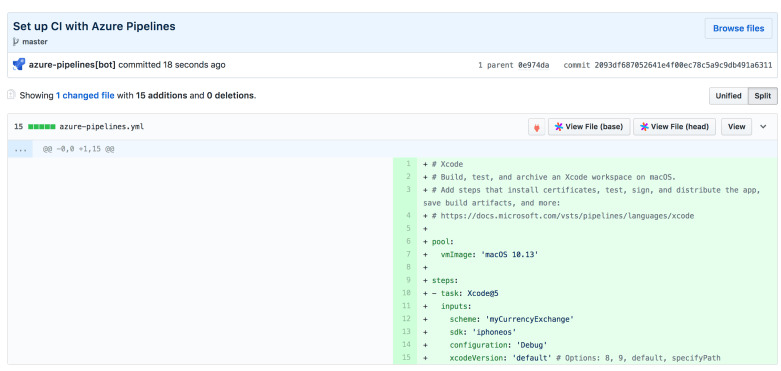
Configuration: https://github.com/KazuCocoa/myCurrencyExchange/blob/master/azure-pipelines.yml
pool:
  vmImage: 'macOS 10.13'
variables:
  scheme: 'myCurrencyExchange'
  sdk: 'iphoneos'
  configuration: 'Debug'
steps:
- script: /usr/local/bin/carthage update --platform ios
  displayName: 'Carthage installation'
- task: Xcode@5
  displayName: 'Running XCTest/XCUITest'
  inputs:
    actions: 'test'
    scheme: '$(scheme)'
    sdk: 'iphonesimulator'
    configuration: '$(configuration)'
    xcodeVersion: 'default' # Options: 8, 9, default, specifyPath
    packageApp: false
    xcWorkspacePath: 'myCurrencyExchange.xcodeproj'
    destinationSimulators: 'iPhone 7'
    destinationTypeOption: 'simulators'
    destinationPlatformOption: 'iOS'
    signingOption: "auto"
    useXcpretty: true
    publishJUnitResults: 'build/reports/junit.xml'
- task: Xcode@5
  displayName: 'Xcode debug build'
  inputs:
    actions: 'build'
    scheme: '$(scheme)'
    sdk: '$(sdk)'
    configuration: '$(configuration)'
    xcodeVersion: 'default'
    packageApp: false
    xcWorkspacePath: 'myCurrencyExchange.xcodeproj'
    useXcpretty: true
Resources
The most important thing is live documentation. Fortunately, configurations for each task have been OSSed.
- Image of vmImage
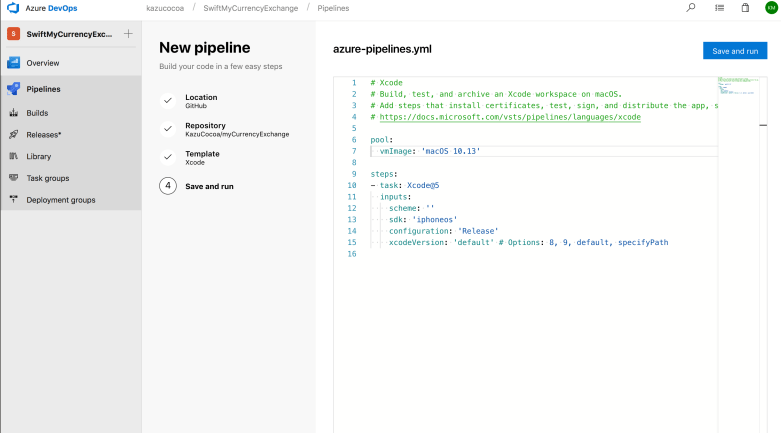
- About pipeline
- Tasks we can set in xcode task
- https://github.com/Microsoft/vsts-tasks/blob/master/Tasks/XcodeV5/task.json
- In the JSON file, we can see various input elements we can speficy in the task
- We also can https://github.com/Microsoft/vsts-tasks/blob/master/Tasks/XcodeV5/xcode.ts to understand the logic how to manage each
inputsof tasks in build environment
- Root of tasks we can run on Azure pipelines
Issues I encountered
Run carthage
To use carthage, we must run /usr/local/bin/carthage update --platform ios first. The macOS image has Carthage. ( See https://github.com/Microsoft/azure-pipelines-image-generation/blob/master/images/macos/macos-Readme.md#package-management )
We can use the package without any installations.
[warning]Multiple Xcode workspace matches were found
In carthage world, it can happen. By default, Azure try to find xcode project/workspace with **/*.xcodeproj/project.xcworkspace. It can find projects/workspaces in Carthage as well.
2018-09-15T10:40:56.0831490Z ##[section]Starting: Xcode
2018-09-15T10:40:56.1011310Z ==============================================================================
2018-09-15T10:40:56.1026760Z Task         : Xcode
2018-09-15T10:40:56.1041650Z Description  : Build, test, or archive an Xcode workspace on macOS. Optionally package an app.
2018-09-15T10:40:56.1057120Z Version      : 5.139.1
2018-09-15T10:40:56.1073880Z Author       : Microsoft Corporation
2018-09-15T10:40:56.1090170Z Help         : [More Information](https://go.microsoft.com/fwlink/?LinkID=613730)
2018-09-15T10:40:56.1106870Z ==============================================================================
2018-09-15T10:40:57.7491740Z ##[warning]Multiple Xcode workspace matches were found. The first match will be used: /Users/vsts/agent/2.140.0/work/1/s/Carthage/Checkouts/Alamofire/Alamofire.xcodeproj/project.xcworkspace
2018-09-15T10:40:57.7767760Z [command]/usr/bin/xcodebuild -version
2018-09-15T10:40:57.7815010Z Xcode 9.4.1
2018-09-15T10:40:57.7843050Z Build version 9F2000
2018-09-15T10:40:57.8653410Z [command]/usr/bin/xcodebuild -sdk iphoneos -configuration Debug -workspace /Users/vsts/agent/2.140.0/work/1/s/Carthage/Checkouts/Alamofire/Alamofire.xcodeproj/project.xcworkspace -scheme myCurrencyExchange build CODE_SIGNING_ALLOWED=NO | /usr/local/bin/xcpretty -r junit --no-color
2018-09-15T10:40:57.9837030Z xcodebuild: error: The workspace named "Alamofire" does not contain a scheme named "myCurrencyExchange". The "-list" option can be used to find the names of the schemes in the workspace.
2018-09-15T10:40:58.0079260Z ##[error]Error: /usr/bin/xcodebuild failed with return code: 65
2018-09-15T10:40:58.0817220Z ##[section]Finishing: Xcode
To avoid it, please specify xcWorkspacePath. *.xcodeproj and *.xcworkspace are available in the option.
Run with CODE_SIGNING_ALLOWED=NO
In the case, XCTest failed.
2018-09-15T17:44:49.9667610Z ▸ Touching myCurrencyExchangeUITests.xctest
2018-09-15T17:44:56.4427330Z 2018-09-15 17:44:56.440 xcodebuild[1421:9979] Error Domain=IDETestOperationsObserverErrorDomain Code=6 "Early unexpected exit, operation never finished bootstrapping - no restart will be attempted" UserInfo={NSLocalizedDescription=Early unexpected exit, operation never finished bootstrapping - no restart will be attempted}
2018-09-15T17:44:56.5746750Z 2018-09-15 17:44:56.440 xcodebuild[1421:9979] Error Domain=IDETestOperationsObserverErrorDomain Code=6 "Early unexpected exit, operation never finished bootstrapping - no restart will be attempted" UserInfo={NSLocalizedDescription=Early unexpected exit, operation never finished bootstrapping - no restart will be attempted}
2018-09-15T17:44:56.5778520Z
2018-09-15T17:44:56.6117960Z Testing failed:
2018-09-15T17:44:56.6144850Z    Early unexpected exit, operation never finished bootstrapping - no restart will be attempted
2018-09-15T17:44:56.6169800Z ** TEST FAILED **
2018-09-15T17:44:56.6178910Z
2018-09-15T17:45:02.6327260Z ##[error]Error: /usr/bin/xcodebuild failed with return code: 65
After setting signingOption: "auto" for example, the issue has been resolved. Finally, I could finish to run all build/test cases.
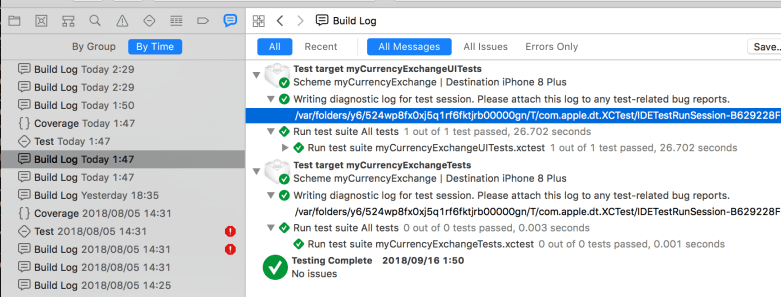
When you struggle with which command should you run, below section in Xcode help you what process is conducted behind the Xcode.
End
Today, I tried running iOS build/test on Azure pipeline. So far, I’m satisfied with the response/speed.
I thought TravisCI and Bitrise is selections for iOS OSS product so far, but for now, the pipeline also becomes a good method for them.
p.s.
atis version number. Xcode@5 is Xcode versions 5 in https://github.com/Microsoft/vsts-tasks/blob/master/Tasks/XcodeV5

 ~ my tech diary ~
Hello, i already created build pipeline which is creating build using MacBook agent whenever I check-in code to git repository in TFS. Now, I am trying to create release pipeline to kick off full test plan/individual test script execution in xcode/xcuitest from Azure TFS. And also get result to TFS test case once execution is finished. However, I could not find any proper guideline to set it up. Could you please guide me step by step to achieve this? I really appreciate for your time and help.
Hi,
Thanks for the comment. But could you ask it for the Azure pipeline support team? I haven’t used such agent configuration, and have no good experience for Azure except for writing YAML steps in this post.
Thanks, signingOption: “auto” was a lifesaver