XCUITestでテストを行う時、アニメーションの都合で処理をまったり、突然の性能劣化がないか、ということを計測することの重要性が高くなります。
そこで、XCTestを使ってそれらを実現する方法を最近調べたのでメモ。
処理性能を計測する
ある範囲の処理の処理性能を計測したい場合があります。
XCTestでは、以下の通り measureMetrics を使って、与えたブロック内の処理を計測、一定の性能劣化があった場合にfailしてくれる機能があります。
This file contains hidden or bidirectional Unicode text that may be interpreted or compiled differently than what appears below. To review, open the file in an editor that reveals hidden Unicode characters.
Learn more about bidirectional Unicode characters
| func testShouldDisplayAlertWithText(){ | |
| // run 10 times and measure performance during it. | |
| // Fail if the performance decrease from baseline. | |
| measureMetrics([XCTPerformanceMetric_WallClockTime], automaticallyStartMeasuring: true, forBlock: { | |
| self.app.buttons["show alert"].tap() | |
| self.app.alerts["Cool title"].collectionViews.buttons["OK"].tap() | |
| XCTAssertFalse(self.app.alerts["Cool title"].exists) | |
| }) | |
| } |
この処理は初期では10回計測を繰り返し、そのうち標準値から標準偏差と平均実行時間を求め、そこから10%以上の劣化があった場合に失敗するというものです。
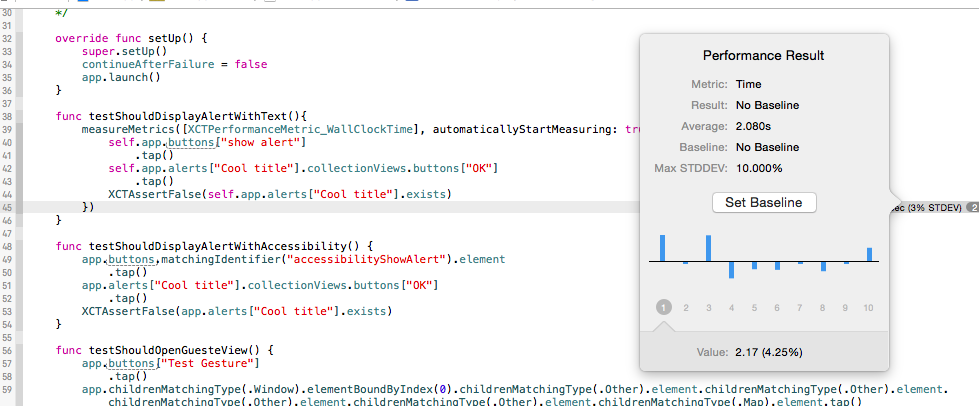
この measureMetrics は細かく設定できる点が良いのですが、以下のような記述だけでも同様なことが計測できます。コードを追うとわかるのですが、この場合、 XCTPerformanceMetric_WallClockTime を返り値とした defaultPerformanceMetrics() が呼ばれるそうです。そのため、実質先に載せたような計測と同様のメソッドになっている、とのこと。
self.measureBlock {
  // 計測したい処理
}
wait untilで処理を待つ
XCUITestを行う時、あるボタンをタップして、期待する要素が表示されるまでに時間が少しかかるときがよくあります。
その場合、以下のように、操作後すぐに assertion するとテストは失敗します。それは、タップ後にアニメーションなどで待ちが発生するからです。
func testShouldOpenGuesteView() {
  app.buttons["Test Gesture"].tap()
  XCTAssertNotNil(self.app.maps.matchingIdentifier("map view").element.exists, "don't display map view")
}
これを回避するために、 waitForExpectationsWithTimeout を使っていわゆるwait until … を行います。XCTestExpectation を定義して、 XCTestExpectation.fulfill を書きます。その後に、assertionをブロックで囲んだ waitForExpectationsWithTimeout を用意します。
これで、テストは成功するようになります。
This file contains hidden or bidirectional Unicode text that may be interpreted or compiled differently than what appears below. To review, open the file in an editor that reveals hidden Unicode characters.
Learn more about bidirectional Unicode characters
| func testShouldOpenGuesteView() { | |
| // define XCTestExpectation to wait on waitForExpectationsWithTimeout | |
| var theExpectation :XCTestExpectation | |
| theExpectation = expectationWithDescription("show map view") | |
| app.buttons["Test Gesture"].tap() | |
| // Tell XCTestExpectation go waitForExpectationsWithTimeout | |
| theExpectation.fulfill() | |
| // Wait handler until interval. | |
| waitForExpectationsWithTimeout(5, handler: { | |
| error in XCTAssertNotNil(self.app.maps.matchingIdentifier("map view").element.exists, "don't display map view") | |
| }) | |
| } |
アニメーションなので、sleepでもよいかなと囁きに負けることがありそうですが、使えるものは有効に使いたいですね。
締め
これらはXcode6の頃から使えるので、人によってはすでに使っているかもしれないです。
XCUITestでは、通信だけではなくGUIのアニメーションに関してもよく使う形になると思うので、少し慣れていきたいですね。
今回の修正コミットは以下。
https://github.com/KazuCocoa/XCUITestExample/commit/797c8b4b6cb1c91c81fd3a96eb669d834d4b49e1


1 Comment